Install on macOS
Crossonic is available as a DMG file and natively supports both Intel and ARM architectures.
Install
Section titled “Install”Visit the releases page, scroll down to Assets and download Crossonic-x.x.x-macOS-universal.dmg.
When you open the file a window with the Crossonic icon and the Applications directory will appear:
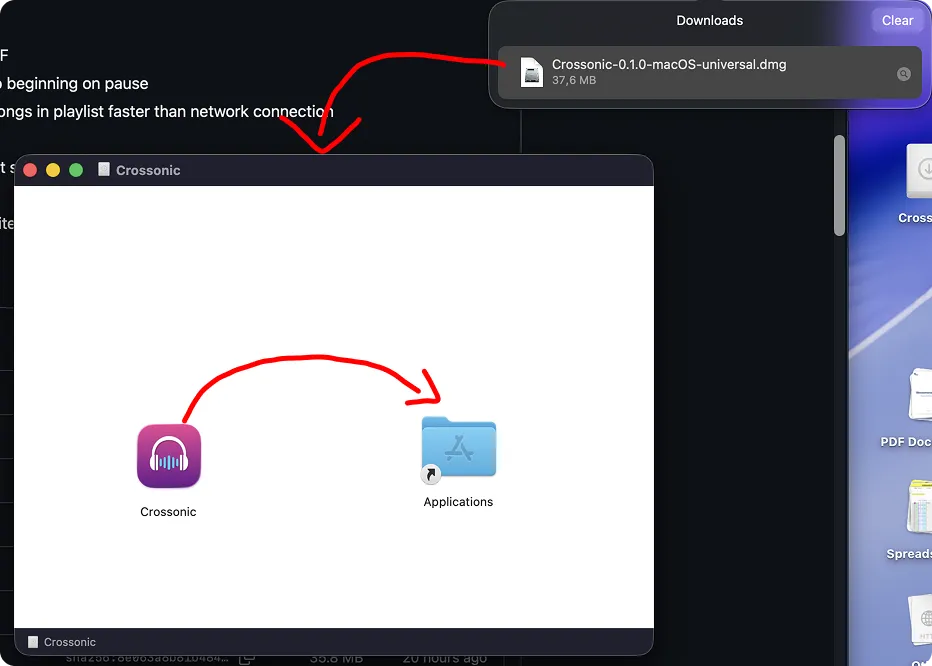
Drag the Crossonic icon on top of the Applications icon. Crossonic is now installed.
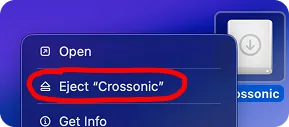
You may now eject the DMG file on your desktop:

Allowing the app to run
Section titled “Allowing the app to run”Because the app is not signed, you’ll need to manually tell macOS that it’s allowed to be executed:
- Launch Crossonic from the application launcher.
- macOS will tell you, that it blocked the app. Click on Done:

- Open the Settings app and navigate to the Privacy & Security tab.
- Scroll down until you see: “Crossonic” was blocked to protect your Mac.

- Click on Open anyway.
- Now the previous dialog appears again with a new Open anyway option:

- When prompted, enter your macOS user password:

- You’ll now be able to open Crossonic any time you like and this procedure should not be needed in the future.
Update
Section titled “Update”Starting with version v0.1.0 Crossonic is able to update itself. Simply click Install when prompted that a new version is available.
This way Crossonic will automatically overwrite itself with the latest version and allow the new version to be executed (preventing these steps from being needed again).
To manually update Crossonic, fully exit the app then follow the install instructions again and confirm to overwrite the existing file when prompted. When you choose this method of updating you’ll need to allow the new version to run again.
Uninstall
Section titled “Uninstall”First, fully exit the App.
Then open the Applications directory in Finder and delete Crossonic.app (the file extension might not be visible).
To fully remove any remaining app data, open a terminal and run these commands:
rm -r ~/Library/Application\ Support/org.crossonic.apprm -r ~/Library/Caches/org.crossonic.appAlternatively, manually delete the directories mentioned in the above commands in Finder (the Library directory is hidden by default).